


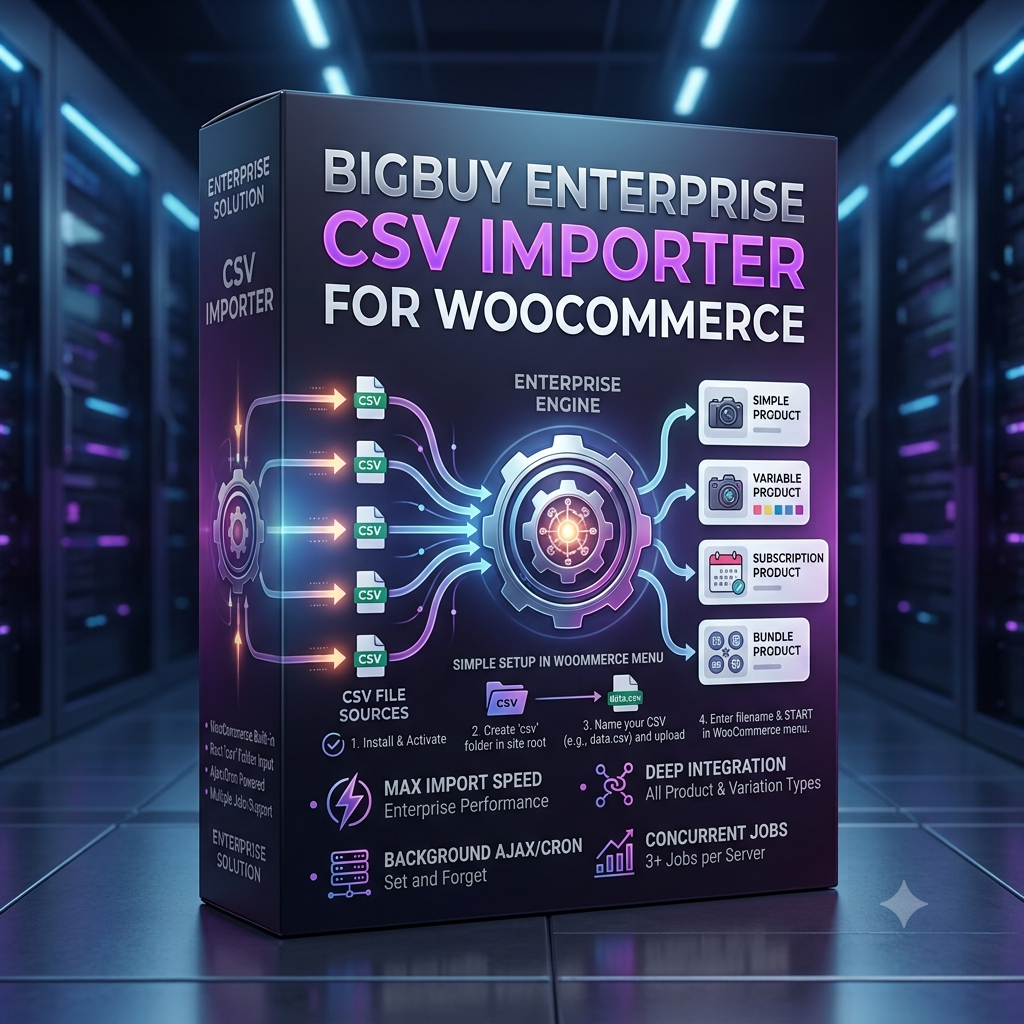

BigBuy Enterprise CSV Importer for WooCommerce
$350.00
Scale your store operations with BigBuy Enterprise CSV Importer for WooCommerce, the ultimate background import engine built for massive bulk product catalogs, complex variations, and high-speed execution.
Key Highlights
-
Automated Background Processing: Uses background Ajax and WP-Cron execution—simply launch the process and close your browser or turn off your computer.
-
Concurrent Multi-Job Engine: Run up to 3 or more bulk import jobs simultaneously per site depending on your server capacity.
-
Complex Variations Support: Easily import simple products as well as complex variable products with all attributes seamlessly mapped.
-
Lightning-Fast Enterprise Speeds: Engineered for maximum efficiency and enterprise-scale speed compared to standard web importers.
-
Zero-Setup Directory Workflow: Pre-configured root folder workflow makes running bulk updates as easy as uploading a single file name.
BigBuy Enterprise CSV Importer for WooCommerce
Managing large product catalogs, bulk updates, and complex inventory imports can cause standard web importers to time out or freeze your server. The BigBuy Enterprise CSV Importer for WooCommerce solves this by shifting performance heavy-lifting to an asynchronous background processing engine designed for scale and stability.
Whether you are importing thousands of new SKUs or regularly syncing drop-shipped inventory, this plugin gives enterprise store owners unmatched processing speeds without keeping a browser window open.
Why Enterprise Stores Need the BigBuy Enterprise CSV Importer for WooCommerce
Standard WordPress importers rely on open browser sessions and HTTP timeouts. If your internet disconnects or your script hits server memory limits, imports crash midway through—leaving partial data and broken product variations.
Using the BigBuy Enterprise CSV Importer for WooCommerce guarantees reliable execution through native background tasks. For full details on managing large e-commerce structures, explore the official WooCommerce Core Documentation.
Key Advantages for High-Volume Merchants
-
Background Ajax & Cron Engine: Initiate your import and freely close your web browser or turn off your workstation while the background queue finishes the job.
-
High-Speed Variation Processing: Specifically optimized for CSV file formats to generate complex product variations at maximum execution speed.
-
Parallel Processing Capability: Support for 3+ simultaneous import jobs per site to update multiple supplier feeds concurrently.
-
Zero Script Timeouts: Background execution bypasses
max_execution_timebrowser limits typical of standard dashboard tools.
How to Use BigBuy Enterprise CSV Importer for WooCommerce
Setting up and running a bulk import is streamlined into a quick 5-step workflow:
+-------------------------------------------------------------------+
|               ENTERPRISE CSV IMPORTER WORKFLOW                    |
|                                                                   |
| 1. Install File Manager  ==> 2. Create /csv/ folder in site root   |
| 3. Upload CSV files      ==> 4. Enter filename in WooCommerce menu |
| 5. Run & Close Browser   ==> [ Enterprise Engine Handles Import ] |
+-------------------------------------------------------------------+
Step-by-Step Setup
-
Install File Manager: Access your server file directory using FTP or a WordPress File Manager plugin.
-
Create the CSV Directory: Create a folder named
csvin your WordPress site root directory (e.g.,public_html/csv/). The plugin is pre-programmed to target this directory automatically. -
Upload Your Files: Place your CSV files directly inside the newly created
/csv/directory. -
Access the Plugin: Navigate to your WordPress Dashboard under WooCommerce > CSV Importer.
-
Run the Import: Simply enter your file name (e.g.,
products.csv) and click start. You can close your page immediately while the background Cron processes everything.
Features of BigBuy Enterprise CSV Importer for WooCommerce
1. Advanced Background Processing
Once triggered, the plugin processes product rows sequentially using background Ajax/Cron handlers. This keeps your WordPress admin fast and prevents memory exhaustion.
2. Full WooCommerce Variable Product Integration
Import simple items, pricing, inventory levels, metadata, and full variable product hierarchies without manual field-mapping headaches.
3. Multi-Job Concurrent Execution
Run multiple CSV files side-by-side depending on server hardware resources—perfect for multi-vendor marketplaces or stores running multiple supplier feeds.
Frequently Asked Questions
Can I turn off my computer while an import is running?
Yes! The BigBuy Enterprise CSV Importer for WooCommerce uses background server tasks (Ajax/Cron). Once you start the process with your filename, you can safely navigate away, log out, or turn off your machine.
What file formats are supported?
To maintain absolute maximum execution speeds and enterprise reliability, the plugin is optimized exclusively for standard .csv file formats.
Upgrade Your Store Infrastructure Today
Stop worrying about timed-out imports and broken variation data. Explore more performance tools on the BigBuy Software Store and supercharge your catalog management with the BigBuy Enterprise CSV Importer for WooCommerce!


Reviews
There are no reviews yet.